

Connect Alibaba Cloud OSS with Blob0
Create a private Alibaba Cloud OSS bucket, give a RAM user access to that bucket only, and connect it to Blob0 for Mac with the correct S3 endpoint and region.
This walkthrough uses the Blob0 0.3.1 connection form and an OSS bucket in China (Beijing). The console screenshots use Alibaba Cloud's Chinese interface; the field table translates the values you need. OSS storage and requests are billed under your Alibaba Cloud account.
Download Blob0 for Mac1. Create a private OSS bucket
Open the Alibaba Cloud OSS console and select Create Bucket. Give it a globally unique name and choose a region close to your data. A bucket name and region cannot be changed later.
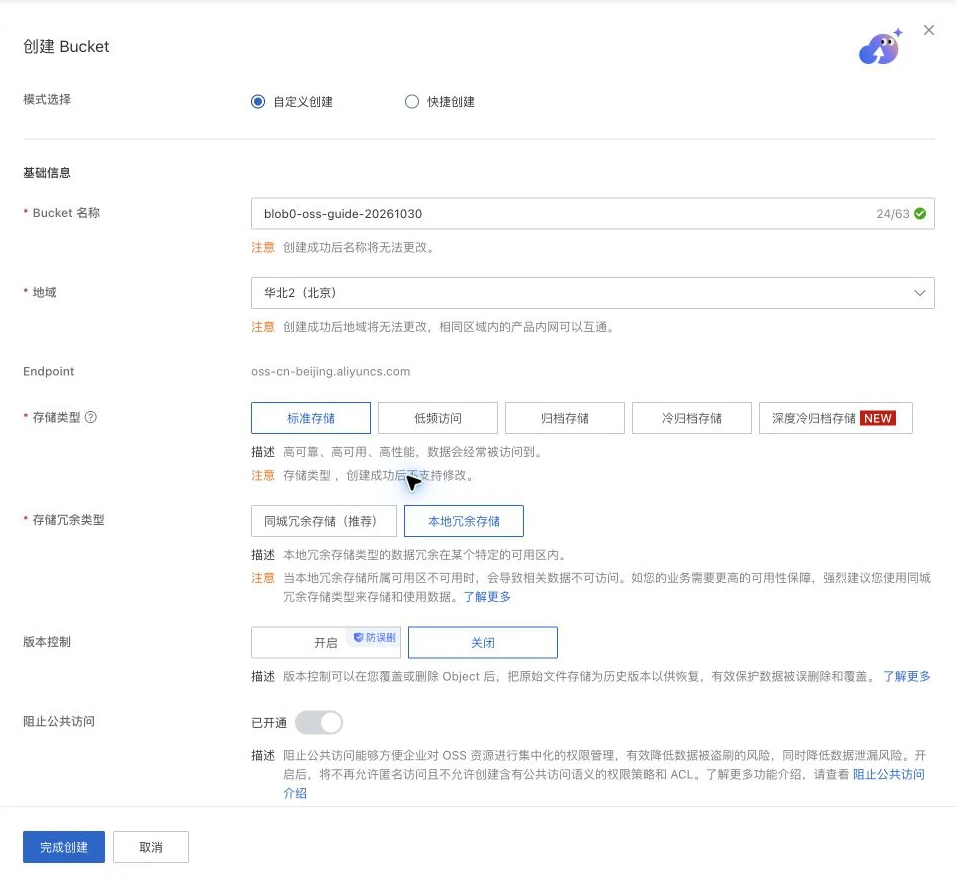
For a normal file library, choose Standard storage. This example uses local redundancy; choose zone redundancy when your availability needs justify its higher storage price. Leave Block Public Access on and Read/Write Permission set to Private.
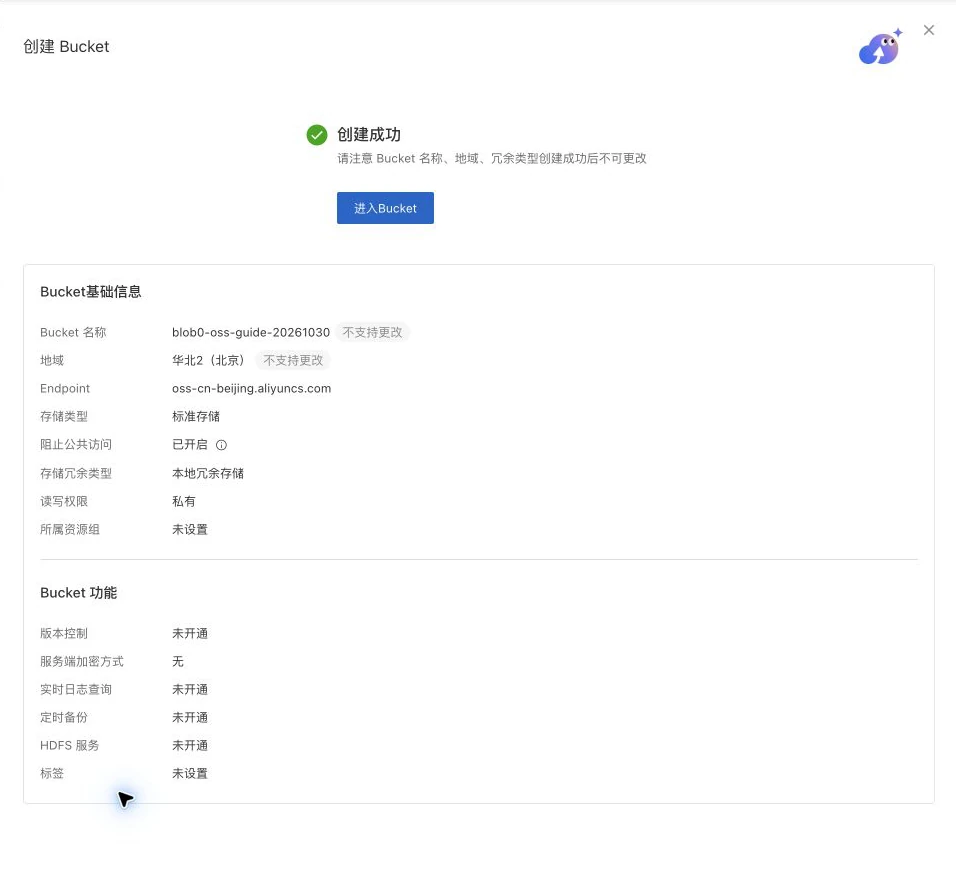
After creation, check the bucket name, region, and private settings. The empty Objects list is an expected starting state. The console shows the OSS endpoint; the S3-compatible endpoint used by Blob0 is explained below.
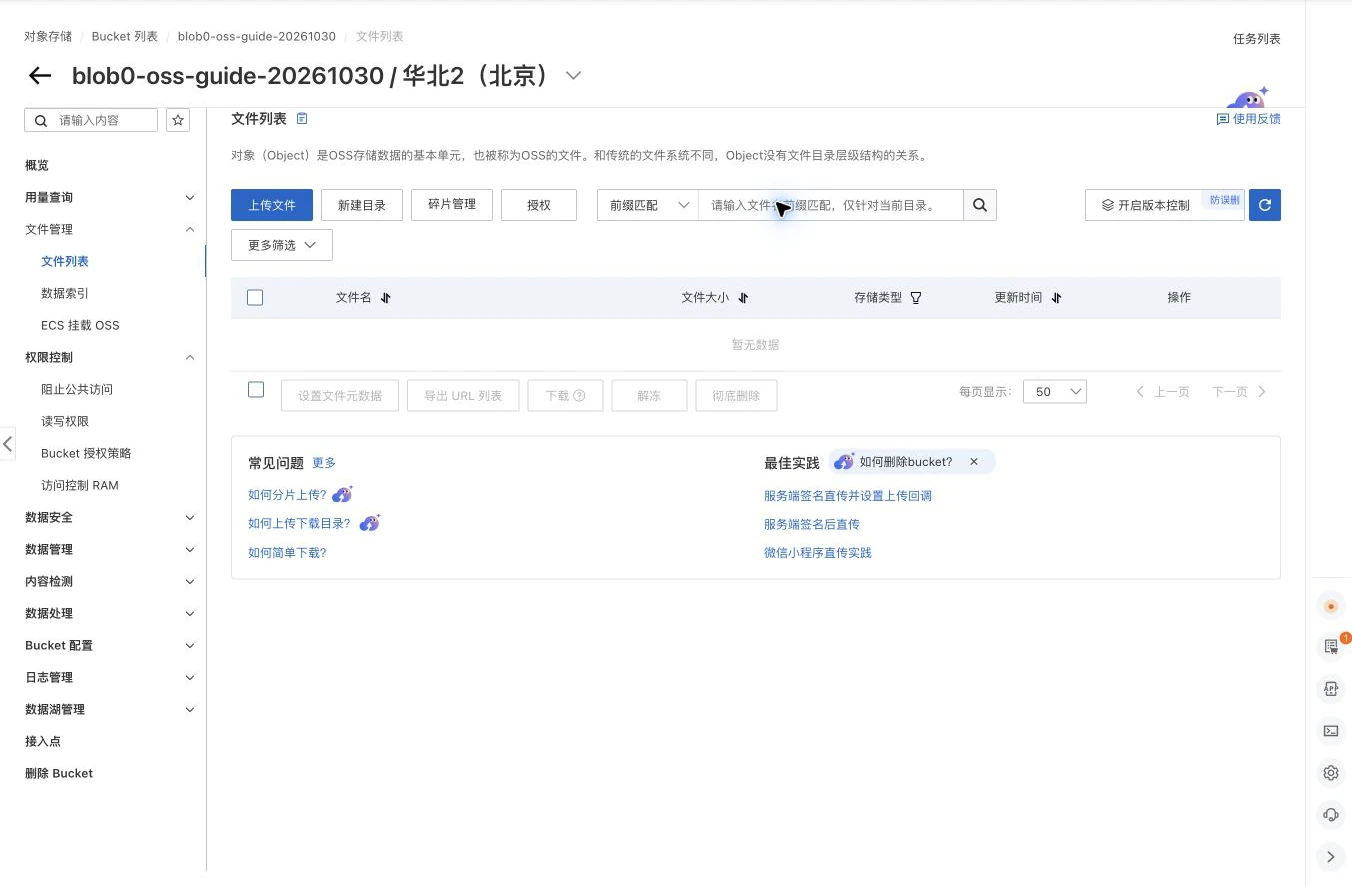
Blob0 authenticates through the S3 API. A public-read bucket, public domain, or disabled Block Public Access setting is unnecessary for a private connection.
2. Create a RAM user with minimum permissions
- In RAM → Users, create a dedicated programmatic user. Enable permanent AccessKey access and leave console access off. Avoid a main-account AccessKey: it would have access far beyond this bucket.
- In RAM → Policies, create a custom policy in script mode. Replace both your-bucket values below with your exact bucket name, then attach the policy to this RAM user. The bucket resource permits root listing and the object resource permits file operations, including multipart cleanup.
- Copy the AccessKey ID and AccessKey Secret when the user is created. The secret is displayed only once. Keep it in your password manager while setting up Blob0, and never put it in a screenshot, issue, or repository.
Example RAM policy for a single bucket. It grants file operations but no bucket creation, bucket deletion, or access to other buckets. Add other actions only if the operations you use require them.
{
  "Version": "1",
  "Statement": [
    {
      "Effect": "Allow",
      "Action": ["oss:ListObjects", "oss:GetBucketInfo"],
      "Resource": "acs:oss:*:*:your-bucket"
    },
    {
      "Effect": "Allow",
      "Action": [
        "oss:GetObject", "oss:PutObject", "oss:DeleteObject",
        "oss:AbortMultipartUpload", "oss:ListParts"
      ],
      "Resource": "acs:oss:*:*:your-bucket/*"
    }
  ]
}
3. Enter the connection in Blob0
Open Settings → Connections → Add connection, select Use access keys instead, then choose Alibaba Cloud OSS under Provider. On first launch, select the manual access-key option from the connection screen.
The OSS console displays a native endpoint such as oss-cn-beijing.aliyuncs.com. For Blob0’s S3-compatible preset, add the s3. prefix: https://s3.oss-cn-beijing.aliyuncs.com. Change both the endpoint and Region when your bucket is elsewhere. The preset uses virtual-hosted addressing.
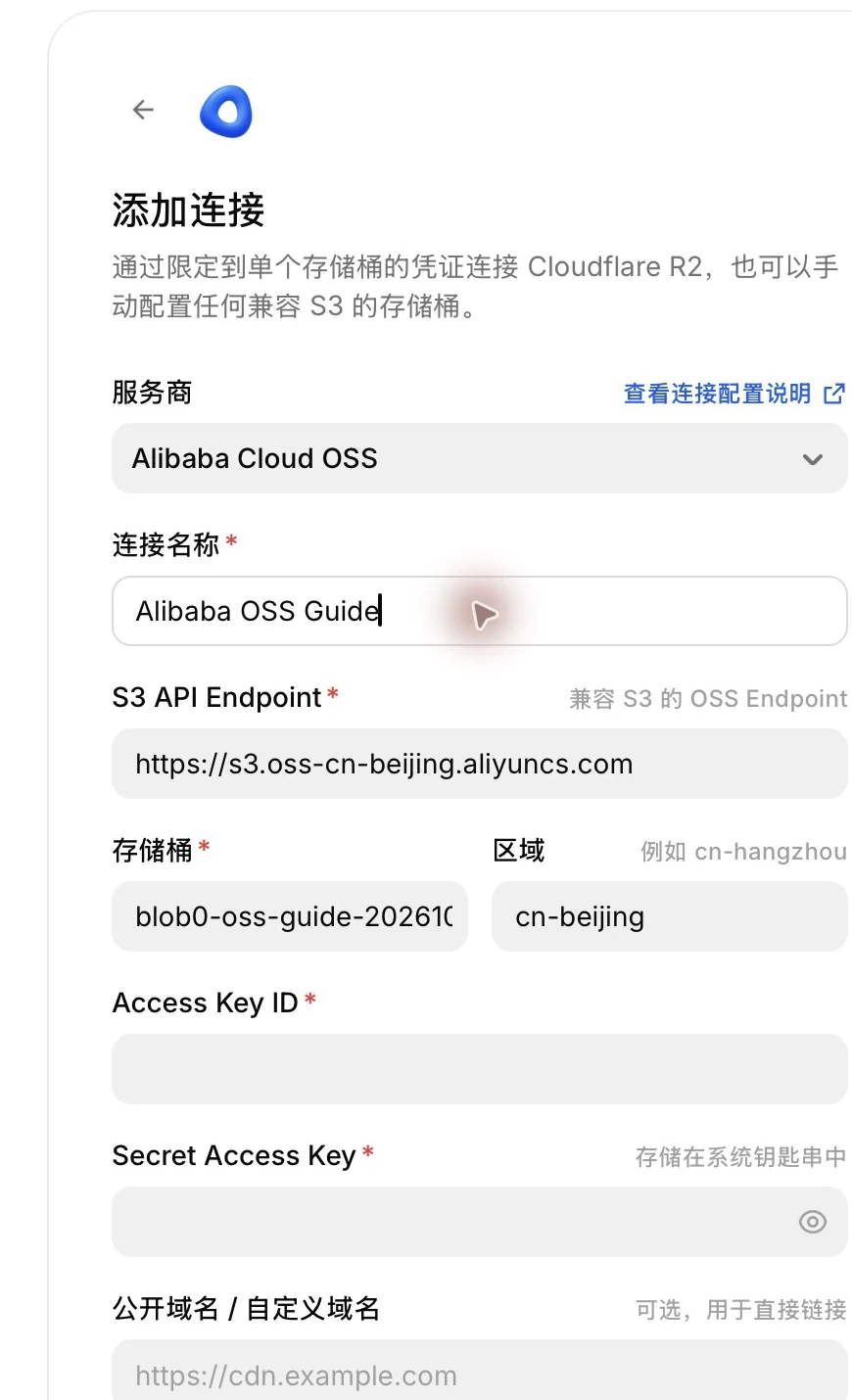
| Field | What to enter |
|---|---|
| Provider | Alibaba Cloud OSS |
| Connection name | A label on your Mac, for example Alibaba OSS Guide |
| S3 API Endpoint | https://s3.oss-cn-beijing.aliyuncs.com for a Beijing bucket |
| Bucket | The exact bucket name, without oss://, an endpoint, or a folder path |
| Region | cn-beijing for a Beijing bucket; match the bucket’s actual region |
| Access Key ID | The dedicated RAM user’s AccessKey ID |
| Secret Access Key | The matching secret; Blob0 stores it in the macOS Keychain |
| Public / custom domain | Leave empty for a private bucket; this field is not the S3 API endpoint |
4. Test and save the connection
- Select Test connection. “Connected” confirms that Blob0 can list the bucket root; zero items is normal for a new bucket. This test does not verify upload, download, or delete permissions.
- Select Add connection to save the profile and open the bucket. The access key secret stays in the macOS Keychain; the profile configuration stores non-sensitive connection metadata.
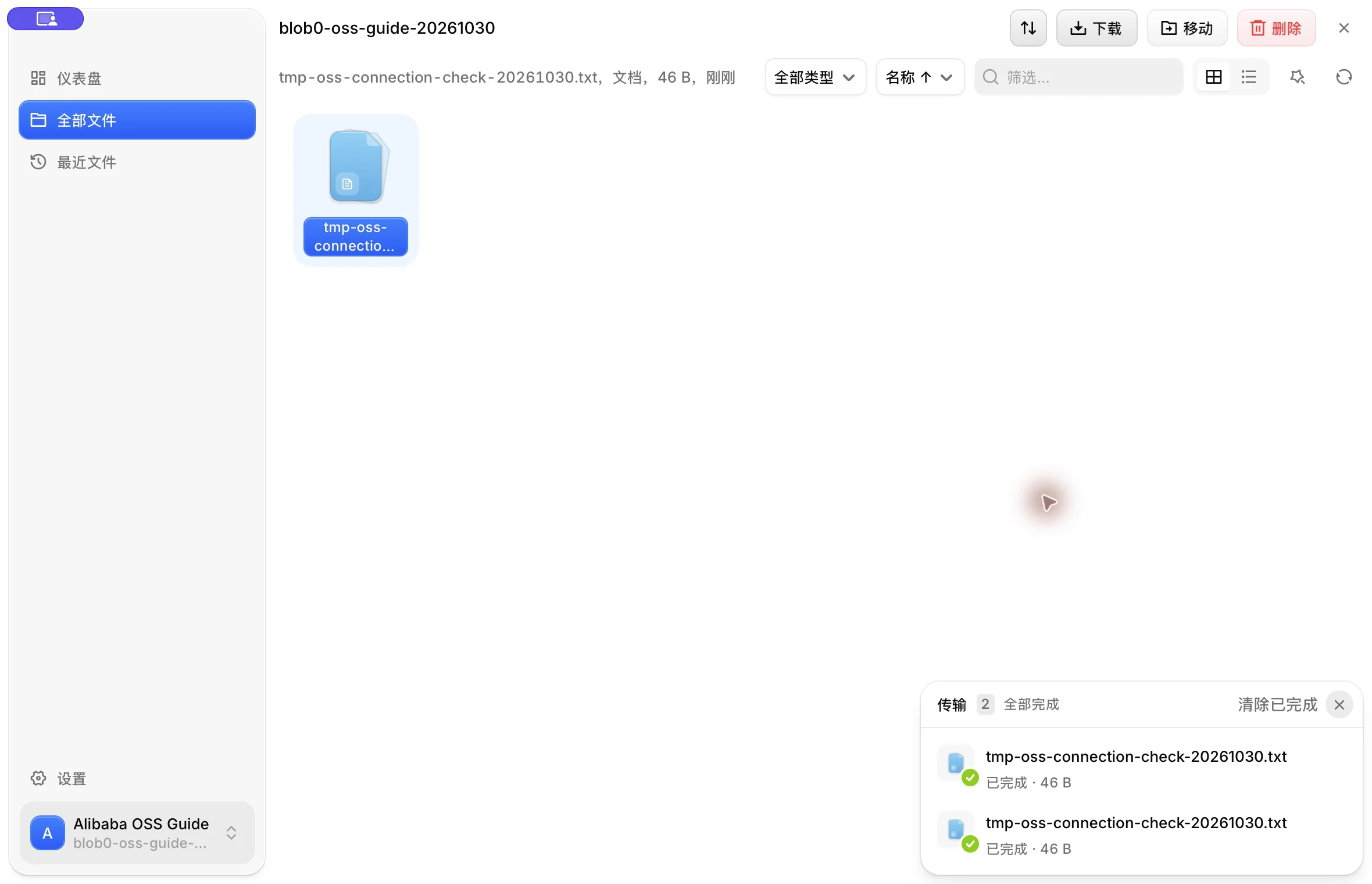
- If you need write access, upload a small disposable file, download it and check its contents, then delete only that test object. Check each operation before relying on the connection for real files.
Troubleshooting
- AccessDenied / 403
- Check that the RAM policy is attached to the same user as the AccessKey. ListObjects belongs on the bucket resource, while object actions belong on bucket/*; keep Block Public Access enabled.
- SignatureDoesNotMatch
- Check that the AccessKey pair matches, the endpoint has s3.oss- and the correct region, and your Mac clock is accurate.
- NoSuchBucket / 404
- Check the exact bucket name and match Region and endpoint to the bucket’s region. OSS does not automatically redirect cross-region S3 requests.
- PublicEndpointForbidden
- Alibaba Cloud restricts default public-domain data APIs for users who enabled OSS on or after March 20, 2025 in mainland China regions. A provider-managed custom domain may be required; verify its S3 compatibility before using it with Blob0. Making the bucket public does not resolve this restriction.
- Multipart upload fails
- Check PutObject and AbortMultipartUpload permission. OSS maps multipart initiation, part uploads, and completion to PutObject; cleanup needs AbortMultipartUpload.
When contacting support, include the Blob0 version, bucket region, operation, and error code. Remove AccessKeys, account IDs, and signed share URLs from screenshots and logs. Rotate a key if it was exposed.
Contact Blob0 supportOfficial sources
- Using AWS SDKs with OSS
- RAM policy examples for OSS
- Create a RAM AccessKey
- OSS public endpoint restriction